Buy bild24.eu ?
We are moving the project
bild24.eu .
Are you interested in purchasing the domain
bild24.eu ?
domain@kv-gmbh.de · 0541-91531010
Buy bild24.eu ?
Can you print your comments in Acrobat Reader?
No, Acrobat Reader is a program designed for viewing and interacting with PDF files, not for editing or adding comments. If you want to add comments to a PDF file, you would need to use Adobe Acrobat or another PDF editing software that allows for annotation and commenting features. **
Can one print their comments in Acrobat Reader?
No, Acrobat Reader does not have a built-in feature to print comments directly from the application. However, users can still print comments by taking a screenshot of the comments section and then printing the screenshot from another application or by using the "Print Screen" function on their computer. Alternatively, users can also use the "Export as Text" feature to save the comments as a text file and then print the file from another application. **
Similar search terms for Reader
Top-Angebote
Products related to Reader:
-
SSO Raise a Reader Raise a Reader Set: Phenomenal PetsFour sweet and funny tales - with tails! - that capture the ups and downs of taking a chance on a furry friend.This set includes:Hedge Over Heels: A Wish NovelHorse Country #1: Can't Be TamedMust Love Pets #1 Friends Fur-EverSwitched Raise a Reader...29,00 $*Shipping: 0,00 $Secure redirect to the provider
-
SSO Raise a Reader Raise a Reader Set: Magical ReadsGet a taste of magic in these stories full of enchanting characters.This set includes:Best Wishes #1Harry Potter and the Sorcerer's StoneLegends of Lotus Island #1: Guardian TestThe School for Wicked Witches Raise a Reader Set: Magical Reads29,00 $*Shipping: 0,00 $Secure redirect to the provider
-
SSO Raise a Reader Raise a Reader Set: Easter StorybooksRead along with your child in these funny and cute Easter stories.This set includes:Gabby's Dollhouse: The Easter Kitty BunnyHappy Easter, Baby Shark!Hey, You're Not the Easter Bunny!Peppa Pig: Easter SurpriseThree Little Superpigs and the Great...29,00 $*Shipping: 0,00 $Secure redirect to the provider
-
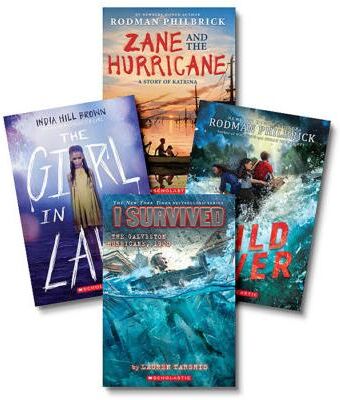
SSO Raise a Reader Raise a Reader Set: Dangerous WatersDive into these action-packed adventures!This set includes:The Girl in the LakeI Survived #21: I Survived the Galveston Hurricane, 1900Wild RiverZane and the Hurricane Raise a Reader Set: Dangerous Waters29,00 $*Shipping: 0,00 $Secure redirect to the provider


-
Why am I being portrayed as stupid as a Bild reader?
You are not being portrayed as stupid as a Bild reader. The Bild newspaper is known for its sensationalist and tabloid-style reporting, which can sometimes be seen as lacking in depth or critical analysis. However, this does not reflect on the intelligence of its readers. People from all walks of life and with varying levels of education may choose to read Bild for a variety of reasons, and it is important not to make assumptions about their intelligence based on their choice of reading material. **
-
Are you a fast reader or a slow reader?
As an AI language model, I don't have the ability to read in the traditional sense, but I can process and analyze text at a very fast rate. My processing speed allows me to quickly understand and respond to a wide range of written content. **
-
Can I print only the highlighted text in Adobe Reader?
Yes, you can print only the highlighted text in Adobe Reader by selecting the highlighted text, right-clicking on it, and choosing the "Print" option. This will open a print dialog box where you can select to print only the selected text. Make sure to adjust the print settings accordingly before printing. **
-
Does Adobe Reader print the PDF in the wrong format?
Adobe Reader typically does not print the PDF in the wrong format. However, printing issues can sometimes occur due to printer settings or compatibility issues. It is recommended to check the printer settings, update Adobe Reader to the latest version, and ensure that the printer drivers are up to date to avoid any formatting issues while printing PDFs. **

Can you only print half of the page with Adobe Reader?
Yes, you can print only half of a page with Adobe Reader by adjusting the print settings. You can select the specific pages you want to print by entering the page range in the print dialog box. For example, if you want to print only the first half of a page, you can enter "1-3" to print the first three pages. This feature allows you to customize your printing options based on your needs. **
Reader, slowly or quickly?
Reader, it ultimately depends on your personal preference and the material you are reading. Some people prefer to read slowly to fully absorb the content and savor the details, while others may prefer to read quickly to get through the material efficiently. Experiment with both approaches to see which one works best for you in different situations. **
Top-Angebote
Products related to Reader:
-
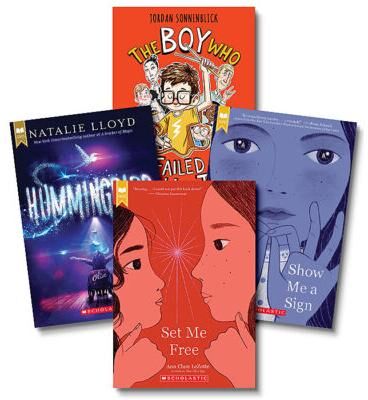
SSO Raise a Reader Raise a Reader Set: ResiliencyHelp children understand and expand their world, and build empathy, with books featuring characters and stories outside of the mainstream narrative. These stories feature characters with disabilities of various natures.This set includes:The Boy Who...29,00 $*Shipping: 0,00 $Secure redirect to the provider
-
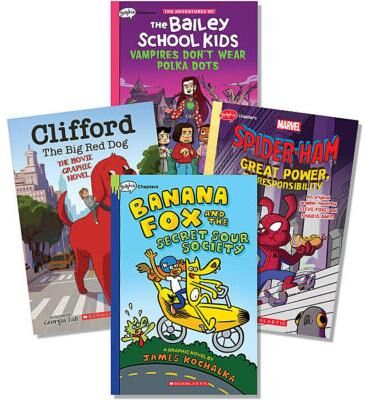
SSO Raise a Reader Raise a Reader Set: Comical CharactersThis set includes:The Bailey School Kids Graphix #1: Vampires Don't Wear Polka DotsBanana Fox #1: Banana Fox and the Secret Sour SocietyClifford the Big Red Dog: The Movie Graphic NovelSpider-Ham: Great Power, No Responsibility Raise a Reader Set:...29,00 $*Shipping: 0,00 $Secure redirect to the provider
-
SSO Raise a Reader Raise a Reader Set: Phenomenal PetsFour sweet and funny tales - with tails! - that capture the ups and downs of taking a chance on a furry friend.This set includes:Hedge Over Heels: A Wish NovelHorse Country #1: Can't Be TamedMust Love Pets #1 Friends Fur-EverSwitched Raise a Reader...29,00 $*Shipping: 0,00 $Secure redirect to the provider
-
SSO Raise a Reader Raise a Reader Set: Magical ReadsGet a taste of magic in these stories full of enchanting characters.This set includes:Best Wishes #1Harry Potter and the Sorcerer's StoneLegends of Lotus Island #1: Guardian TestThe School for Wicked Witches Raise a Reader Set: Magical Reads29,00 $*Shipping: 0,00 $Secure redirect to the provider
-
Can you print your comments in Acrobat Reader?
No, Acrobat Reader is a program designed for viewing and interacting with PDF files, not for editing or adding comments. If you want to add comments to a PDF file, you would need to use Adobe Acrobat or another PDF editing software that allows for annotation and commenting features. **
-
Can one print their comments in Acrobat Reader?
No, Acrobat Reader does not have a built-in feature to print comments directly from the application. However, users can still print comments by taking a screenshot of the comments section and then printing the screenshot from another application or by using the "Print Screen" function on their computer. Alternatively, users can also use the "Export as Text" feature to save the comments as a text file and then print the file from another application. **
-
Why am I being portrayed as stupid as a Bild reader?
You are not being portrayed as stupid as a Bild reader. The Bild newspaper is known for its sensationalist and tabloid-style reporting, which can sometimes be seen as lacking in depth or critical analysis. However, this does not reflect on the intelligence of its readers. People from all walks of life and with varying levels of education may choose to read Bild for a variety of reasons, and it is important not to make assumptions about their intelligence based on their choice of reading material. **
-
Are you a fast reader or a slow reader?
As an AI language model, I don't have the ability to read in the traditional sense, but I can process and analyze text at a very fast rate. My processing speed allows me to quickly understand and respond to a wide range of written content. **
Similar search terms for Reader
-
SSO Raise a Reader Raise a Reader Set: Easter StorybooksRead along with your child in these funny and cute Easter stories.This set includes:Gabby's Dollhouse: The Easter Kitty BunnyHappy Easter, Baby Shark!Hey, You're Not the Easter Bunny!Peppa Pig: Easter SurpriseThree Little Superpigs and the Great...29,00 $*Shipping: 0,00 $Secure redirect to the provider
-
SSO Raise a Reader Raise a Reader Set: Dangerous WatersDive into these action-packed adventures!This set includes:The Girl in the LakeI Survived #21: I Survived the Galveston Hurricane, 1900Wild RiverZane and the Hurricane Raise a Reader Set: Dangerous Waters29,00 $*Shipping: 0,00 $Secure redirect to the provider
-
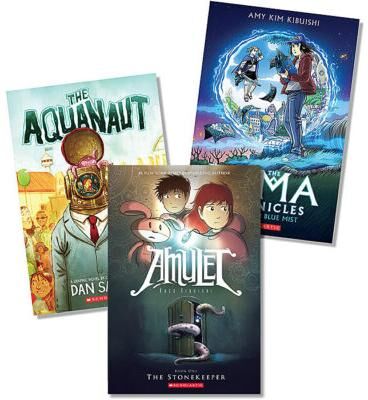
SSO Raise a Reader Raise a Reader Set: Extraordinary JourneysThe power of love and family are at the heart of these three extraordinary adventures.This set includes:Amulet #1: The StonekeeperThe AquanautThe Rema Chronicles #1: Realm of the Blue Mist Raise a Reader Set: Extraordinary Journeys29,00 $*Shipping: 0,00 $Secure redirect to the provider
-
SSO Raise a Reader Raise a Reader Set: Gamer TalesVenture into these online escapades featuring stories from the humorous, to the mysterious and horror-filled.This set includes:Game OverLast Gamer StandingLevel 13Piggy: Infected Raise a Reader Set: Gamer Tales29,00 $*Shipping: 0,00 $Secure redirect to the provider
-
Can I print only the highlighted text in Adobe Reader?
Yes, you can print only the highlighted text in Adobe Reader by selecting the highlighted text, right-clicking on it, and choosing the "Print" option. This will open a print dialog box where you can select to print only the selected text. Make sure to adjust the print settings accordingly before printing. **
-
Does Adobe Reader print the PDF in the wrong format?
Adobe Reader typically does not print the PDF in the wrong format. However, printing issues can sometimes occur due to printer settings or compatibility issues. It is recommended to check the printer settings, update Adobe Reader to the latest version, and ensure that the printer drivers are up to date to avoid any formatting issues while printing PDFs. **
-
Can you only print half of the page with Adobe Reader?
Yes, you can print only half of a page with Adobe Reader by adjusting the print settings. You can select the specific pages you want to print by entering the page range in the print dialog box. For example, if you want to print only the first half of a page, you can enter "1-3" to print the first three pages. This feature allows you to customize your printing options based on your needs. **
-
Reader, slowly or quickly?
Reader, it ultimately depends on your personal preference and the material you are reading. Some people prefer to read slowly to fully absorb the content and savor the details, while others may prefer to read quickly to get through the material efficiently. Experiment with both approaches to see which one works best for you in different situations. **
* All prices are inclusive of VAT and, if applicable, plus shipping costs. The offer information is based on the details provided by the respective shop and is updated through automated processes. Real-time updates do not occur, so deviations can occur in individual cases. ** Note: Parts of this content were created by AI.