Buy bild24.eu ?
We are moving the project
bild24.eu .
Are you interested in purchasing the domain
bild24.eu ?
domain@kv-gmbh.de · 0541-91531010
Buy bild24.eu ?
Does the printer save the print file?
No, the printer typically does not save the print file. Once the file is sent to the printer and the printing process is completed, the file is not stored in the printer's memory. The printer only processes and prints the file in real-time and does not retain a copy of the file for future use. If you need to reprint the same file, you would need to resend it to the printer. **
How can I print a PNG file?
To print a PNG file, you can simply open the file on your computer using an image viewing software or a web browser. Once the file is open, you can go to the print option either by right-clicking on the image or using the menu bar. From there, you can select your printer, adjust the print settings such as paper size and quality, and then click on the print button to print the PNG file. **


Similar search terms for File
Top-Angebote
Products related to File:
-
Rio Professional Electric Nail File electric nail file 1 pcRIO Professional Electric Nail File, 1 pc, Manicure and Nail Files for Women, Manicured nails are your calling card - show yourself in the best light. This nail file from RIOProfessional Electric Nail File allows you to shape your nails in the comfort of your own home, as well as make minor adjustments to achieve a beauty salon look. Your nails will always look neat, manicured and free of any irregularities. Characteristics: shapes and shortens nails the gentle sanding surface does not damage the protective layer of natural nails long-lasting surface of the nail file practical shape for a better grip smooths the surface of the nails How to use: Follow the instructions for use.63,60 £*Shipping: 3,99 £Secure redirect to the provider
-
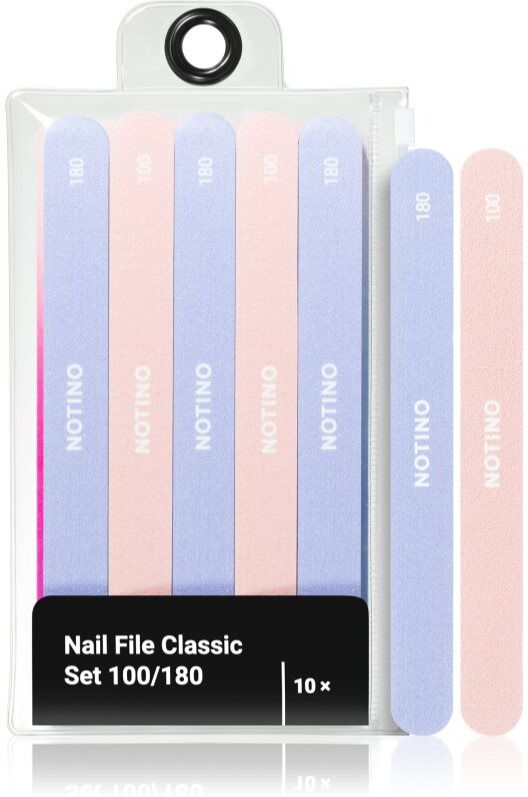
Notino Nail File Classic Set 100/180 nail file setNotino Nail File Classic Set 100/180, 10 pc, Manicure and Nail Files for Women, Neat nails make an impression – show yourself in the best light without having to visit a professional salon. The Notino Nail File Classic Set 100/180 nail file allows you to shape your nails in the comfort of your home and make minor adjustments to achieve a salon-like look. It’ll make your nails always look neat, well-groomed and free of any irregularities. Characteristics: files accurately and symmetrically shapes and shortens nails prevents nails from splitting and breaking5,19 £*Shipping: 3,99 £Secure redirect to the provider
-
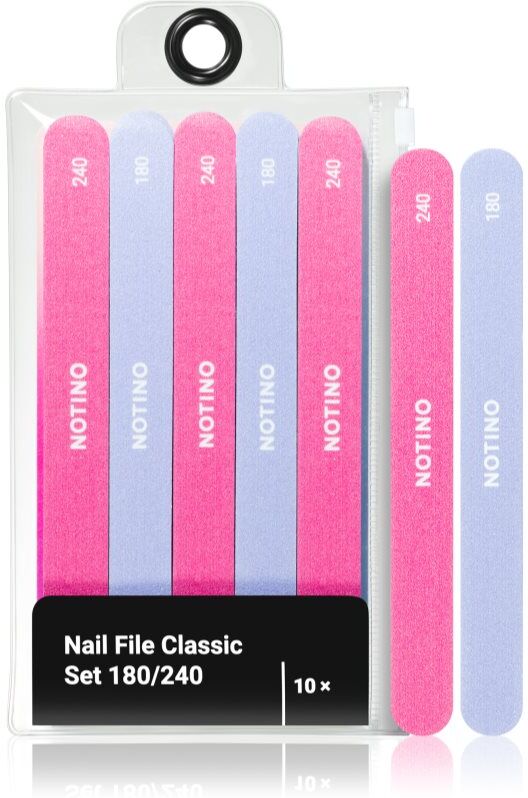
Notino Nail File Classic Set 180/240 nail file setNotino Nail File Classic Set 180/240, 10 pc, Manicure and Nail Files for Women, Neat nails make an impression – show yourself in the best light without having to visit a professional salon. The Notino Nail File Classic Set 180/240 nail file allows you to shape your nails in the comfort of your home and make minor adjustments to achieve a salon-like look. It’ll make your nails always look neat, well-groomed and free of any irregularities. Characteristics: shapes and shortens nails prevents nails from splitting and breaking files accurately and symmetrically4,90 £*Shipping: 3,99 £Secure redirect to the provider
-
Beter Hardness FileHealth and Beauty Nails Beter Hardness File With silicon carbide abrasive it removes the hardness of the feet effectively, leaving them very soft and fine. It is recommended that before proceeding to remove calluses, you first place your feet in warm water to soften the skin. How to use Prepare the skin with a soapy water bath and rub the area to be treated until obtaining a fine and smooth skin.1,91 £*Shipping: 3,99 £Secure redirect to the provider


-
Where can one print a Word file?
One can print a Word file at home using a personal printer, at a local print shop or office supply store, or at a public library. Many universities and colleges also offer printing services for students. Additionally, some workplaces may have printers available for employees to use. **
-
How do I print a file from FreeCAD?
To print a file from FreeCAD, you can go to the 'File' menu and select 'Print'. This will open the print dialog box where you can choose your printer, adjust print settings, and then click 'Print' to send the file to the printer. Make sure your printer is properly set up and connected to your computer before attempting to print from FreeCAD. **
-
How can I 3D print a Blender file?
To 3D print a Blender file, you first need to ensure that your model is correctly prepared for 3D printing. This includes checking for any errors, making sure the size is appropriate, and adding supports if needed. Once your model is ready, you can export it as an STL file from Blender. Then, you can use slicing software such as Cura or PrusaSlicer to prepare the file for your specific 3D printer. Finally, load the sliced file onto your 3D printer and start the printing process. **
-
What file format does a digital picture frame require?
A digital picture frame typically requires image files in formats such as JPEG or PNG. These formats are widely supported and can be easily displayed on most digital picture frames. It's important to check the specifications of the specific digital picture frame you are using to ensure compatibility with the file format of your images. **

How can you attach a cover artwork to an M4A file using Python?
You can attach a cover artwork to an M4A file using Python by using the mutagen library. First, you would need to install the mutagen library using pip. Then, you can use the following code to attach a cover artwork to the M4A file: ```python from mutagen.mp4 import MP4, MP4Cover audio_file = MP4("your_audio_file.m4a") with open("cover_artwork.jpg", "rb") as f: cover_art = f.read() audio_file["covr"] = [MP4Cover(cover_art)] audio_file.save() ``` This code opens the M4A file, reads the cover artwork from a separate file, attaches it to the M4A file, and then saves the changes. **
How do I print a PDF file double-sided?
To print a PDF file double-sided, you will need a printer that supports duplex printing. First, open the PDF file on your computer and click on the print option. In the print dialog box, look for the option to print double-sided or duplex printing. Select this option and then proceed to print your document. Make sure to follow any additional prompts or settings to ensure the pages are printed correctly on both sides. **
Top-Angebote
Products related to File:
-
Multicon Wholesale Hub Auto Body Shaping File Premium Car Body File Tool Auto Body Shaping File Premium Car Body File ToolGet prolevel smoothing and shaping right in your hands with this heavyduty car body file tool designed for precision and durability. Whether youre a seasoned autobody technician or a DIY enthusiast tackling dents and panel imperfections, this tool...59,97 $*Shipping: 0,00 $Secure redirect to the provider
-
So Eco Wooden Foot File scraper foot file 1 pcSo Eco Wooden Foot File, 1 pc, Pedicure for Women, So Eco Wooden Foot File is the perfect complement to your daily skincare routine. Characteristics: removes hardened skin on your feet intensely regenerates the skin of your feet3,36 £*Shipping: 3,99 £Secure redirect to the provider
-
Rio Professional Electric Nail File electric nail file 1 pcRIO Professional Electric Nail File, 1 pc, Manicure and Nail Files for Women, Manicured nails are your calling card - show yourself in the best light. This nail file from RIOProfessional Electric Nail File allows you to shape your nails in the comfort of your own home, as well as make minor adjustments to achieve a beauty salon look. Your nails will always look neat, manicured and free of any irregularities. Characteristics: shapes and shortens nails the gentle sanding surface does not damage the protective layer of natural nails long-lasting surface of the nail file practical shape for a better grip smooths the surface of the nails How to use: Follow the instructions for use.63,60 £*Shipping: 3,99 £Secure redirect to the provider
-
Notino Nail File Classic Set 100/180 nail file setNotino Nail File Classic Set 100/180, 10 pc, Manicure and Nail Files for Women, Neat nails make an impression – show yourself in the best light without having to visit a professional salon. The Notino Nail File Classic Set 100/180 nail file allows you to shape your nails in the comfort of your home and make minor adjustments to achieve a salon-like look. It’ll make your nails always look neat, well-groomed and free of any irregularities. Characteristics: files accurately and symmetrically shapes and shortens nails prevents nails from splitting and breaking5,19 £*Shipping: 3,99 £Secure redirect to the provider
-
Does the printer save the print file?
No, the printer typically does not save the print file. Once the file is sent to the printer and the printing process is completed, the file is not stored in the printer's memory. The printer only processes and prints the file in real-time and does not retain a copy of the file for future use. If you need to reprint the same file, you would need to resend it to the printer. **
-
How can I print a PNG file?
To print a PNG file, you can simply open the file on your computer using an image viewing software or a web browser. Once the file is open, you can go to the print option either by right-clicking on the image or using the menu bar. From there, you can select your printer, adjust the print settings such as paper size and quality, and then click on the print button to print the PNG file. **
-
Where can one print a Word file?
One can print a Word file at home using a personal printer, at a local print shop or office supply store, or at a public library. Many universities and colleges also offer printing services for students. Additionally, some workplaces may have printers available for employees to use. **
-
How do I print a file from FreeCAD?
To print a file from FreeCAD, you can go to the 'File' menu and select 'Print'. This will open the print dialog box where you can choose your printer, adjust print settings, and then click 'Print' to send the file to the printer. Make sure your printer is properly set up and connected to your computer before attempting to print from FreeCAD. **
Similar search terms for File
-
Notino Nail File Classic Set 180/240 nail file setNotino Nail File Classic Set 180/240, 10 pc, Manicure and Nail Files for Women, Neat nails make an impression – show yourself in the best light without having to visit a professional salon. The Notino Nail File Classic Set 180/240 nail file allows you to shape your nails in the comfort of your home and make minor adjustments to achieve a salon-like look. It’ll make your nails always look neat, well-groomed and free of any irregularities. Characteristics: shapes and shortens nails prevents nails from splitting and breaking files accurately and symmetrically4,90 £*Shipping: 3,99 £Secure redirect to the provider
-
Beter Hardness FileHealth and Beauty Nails Beter Hardness File With silicon carbide abrasive it removes the hardness of the feet effectively, leaving them very soft and fine. It is recommended that before proceeding to remove calluses, you first place your feet in warm water to soften the skin. How to use Prepare the skin with a soapy water bath and rub the area to be treated until obtaining a fine and smooth skin.1,91 £*Shipping: 3,99 £Secure redirect to the provider
-
Crystal Bohemia File´n Shine Pink glass nail file 1 pcCrystal Bohemia File´n Shine Pink, 1 pc, Manicure and Nail Files for Women, Neat nails make an impression – show yourself in the best light without having to visit a professional salon. The Crystal Bohemia File´n Shine Pink nail file allows you to shape your nails in the comfort of your home and make minor adjustments to achieve a salon-like look. It’ll make your nails always look neat, well-groomed and free of any irregularities. Characteristics: files accurately and symmetrically the ideal file for travel and your handbag prevents nails from splitting and breaking shapes and shortens nails How to use: Place on the nail and file in gentle strokes going in one direction.3,32 £*Shipping: 3,99 £Secure redirect to the provider
-
How can I 3D print a Blender file?
To 3D print a Blender file, you first need to ensure that your model is correctly prepared for 3D printing. This includes checking for any errors, making sure the size is appropriate, and adding supports if needed. Once your model is ready, you can export it as an STL file from Blender. Then, you can use slicing software such as Cura or PrusaSlicer to prepare the file for your specific 3D printer. Finally, load the sliced file onto your 3D printer and start the printing process. **
-
What file format does a digital picture frame require?
A digital picture frame typically requires image files in formats such as JPEG or PNG. These formats are widely supported and can be easily displayed on most digital picture frames. It's important to check the specifications of the specific digital picture frame you are using to ensure compatibility with the file format of your images. **
-
How can you attach a cover artwork to an M4A file using Python?
You can attach a cover artwork to an M4A file using Python by using the mutagen library. First, you would need to install the mutagen library using pip. Then, you can use the following code to attach a cover artwork to the M4A file: ```python from mutagen.mp4 import MP4, MP4Cover audio_file = MP4("your_audio_file.m4a") with open("cover_artwork.jpg", "rb") as f: cover_art = f.read() audio_file["covr"] = [MP4Cover(cover_art)] audio_file.save() ``` This code opens the M4A file, reads the cover artwork from a separate file, attaches it to the M4A file, and then saves the changes. **
-
How do I print a PDF file double-sided?
To print a PDF file double-sided, you will need a printer that supports duplex printing. First, open the PDF file on your computer and click on the print option. In the print dialog box, look for the option to print double-sided or duplex printing. Select this option and then proceed to print your document. Make sure to follow any additional prompts or settings to ensure the pages are printed correctly on both sides. **
* All prices are inclusive of VAT and, if applicable, plus shipping costs. The offer information is based on the details provided by the respective shop and is updated through automated processes. Real-time updates do not occur, so deviations can occur in individual cases. ** Note: Parts of this content were created by AI.